
Windows: Copy - Paste – Undo - Rename with keyboard shortcuts
There are some keyboard shortcuts, which I use frequently and are very useful.
Copy files from one
place to the other – it works in
almost any imaginable situation,
even when these commands are not visible to use with a mouse.
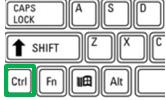
Location of the Ctrl key
(German keyboards: Strg)
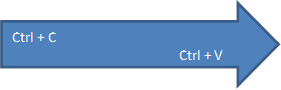
Ctrl + C |
Copy |
Ctrl + V
|
Paste |
Ctrl + X
|
Cut / Move (Copy and then deletes at the origin) |
Ctrl + Z
|
Undo last action |
 +
+ 


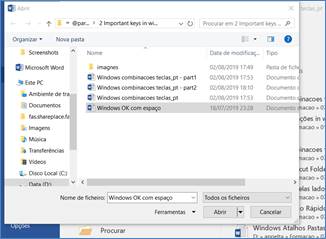
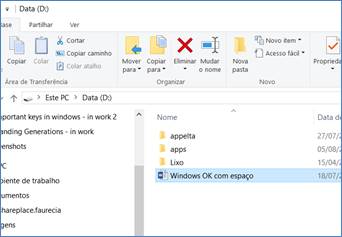
Here is an example of a seemingly impossible situation: copy a file from a Dialog Window to File Explorer – see next page:
Þ On the left we have the Dialog
Window from MS Word, when we are looking for a file to open.
Þ
On the right we have the Windows File Explorer
1. In MS Word, Menu – File – Open |
2. Open a File Explorer window |
3.
In Dialog Window, select a file with the mouse, and then copy it with
the shortcut Ctrl + C (or cut it with Ctrl + X to move
it) |
4. Paste the file in Explorer with Ctrl +V. |
5. The Dialog Window is still open. We can continue to work in MS Word |
We can also do this Copy – Paste of files directly inside the Dialog WIndow of MS Word, from a folder to another.
Þ Imagine now that I used Ctrl + X to move a file, and after pasting it in the new folder … aaaahhhh, mistake!
I moved the wrong file!! I need to come back! What now??
Use Ctrl + Z to undo this last
action. The file returns to the original folder. YES ! ! Ctrl+Z works to undo
file Copy / Cut – Paste ! !
And it also works when the file is deleted, to recover it promptly!
(when the file is sent to the Recycle bin)
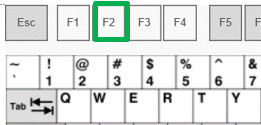
Þ At the end, after all these operations, to rename the file, I use the key F2 which is the quickest method!
|
Rename / change filename |
Do try this!
. . : Topo : . .